


The Professional Guide to Choosing a Racing Sim Monitor in 2026
What if the reason you're missing the apex at Spa isn't your braking technique, but a 5-millisecond delay in your display's response time? Most drivers focus on direct-drive torque, yet they often overlook how motion blur and incorrect FOV settings compromise their spatial awareness. You've likely felt the frustration of depth perception issues during tight overtakes or noticed your high-resolution GPU struggling against a mismatched racing sim monitor. It's a common technical bottleneck that separates casual enthusiasts from those at the top of the telemetry charts.
I'll show you how to master the nuances of refresh rates and panel technology to achieve zero-latency visual feedback and 1:1 scale immersion. We're going to break down the 2026 hardware landscape, comparing 240Hz OLED panels with the latest MicroLED ultra-ultrawides to ensure your setup is future-proof. At Apevie Simulator, we've tested these configurations to find the sweet spot where technical specs meet real-world performance; this guide provides the framework for selecting a display interface that yields consistent podium finishes.
Key Takeaways
- Understand why your display is a critical performance component that functions as a high-speed feedback loop for driver inputs.
- Identify the 2026 technical "sweet spots" for your racing sim monitor, focusing on why 1440p resolution often outperforms 4K in professional competition.
- Use our FOV decision framework to choose between triple-monitor arrays and ultrawide configurations based on your GPU’s pixel-processing limits.
- Learn how to navigate the structural requirements of heavy display mounting to ensure total stability on motion-capable simulator rigs.
- Discover the professional calibration techniques used to eliminate sync issues and ensure color accuracy for a seamless visual interface.
The Sensory Interface: Why Your Monitor is a Performance Component
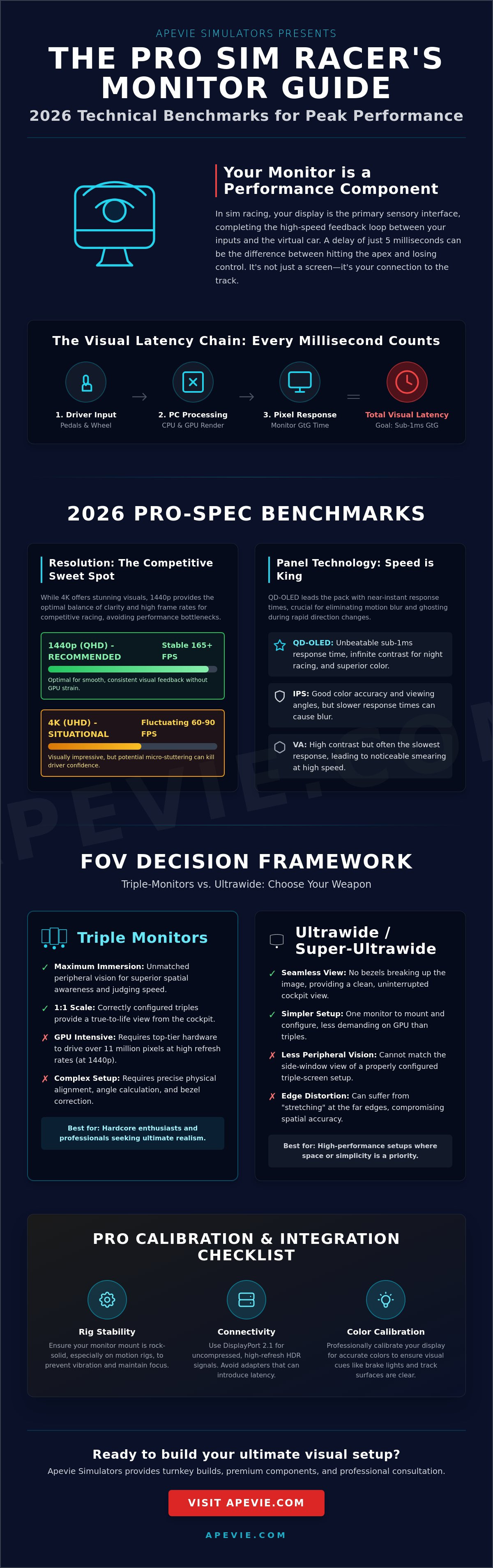
You can't drive what you can't see. In high-end simulation, your eyes provide nearly 80% of the data your brain needs to navigate a circuit at 200 miles per hour. The racing sim monitor isn't just a screen; it's the primary sensory interface that completes the feedback loop between your physical inputs and the digital physics engine. While a standard office or entry-level gaming panel might suffice for casual titles, professional simulators require visual precision that eliminates the guesswork from high-speed cornering. If you're building a rig to accurately simulate auto racing, you need a component that translates physics into immediate, actionable visual data without delay.
Standard gaming monitors often prioritize color saturation or general brightness over the raw speed required for competitive driving. When you're hunting for a tenth of a second at Spa-Francorchamps, you rely on consistent braking markers. If your display suffers from motion blur or inconsistent refresh rates, those markers shift by several feet at high speeds. This inconsistency forces your brain to compensate, which leads to mental fatigue and slower lap times. Transitioning to a professional setup means moving away from visual enjoyment toward spatial accuracy.
The Myth of "Good Enough" Displays
Pairing a high-end Simucube 2 Pro with a mediocre screen is like putting budget tires on a Porsche 911. The wheel base provides instant tactile feedback, but if the visual representation of that movement lags by even a few milliseconds, your muscle memory will fail you. Micro-stuttering is the silent killer of driver confidence. It creates a subtle disconnect that makes the car feel floaty or unpredictable. Professional drivers rely heavily on peripheral vision to judge speed and spatial orientation. A premium racing sim monitor ensures that the environment moving past your side windows stays sharp. This allows your brain to process velocity naturally without the disorientation caused by low-tier panels.
Visual Latency vs. Input Lag
Latency is the total time it takes for your physical input to manifest as a pixel change on the screen. It's a cumulative chain starting from your pedals, moving through the PC, and ending at the display. In 2026, the standard for elite builds is sub-1ms gray-to-gray (GtG) response times. This isn't just a marketing number. It's a technical requirement to prevent ghosting during rapid weight transfers. When you flick the car through a chicane, every millisecond of delay in the visual response disrupts your ability to catch a slide. By minimizing this gap, you ensure the digital car reacts as fast as your reflexes allow. This creates the seamless immersion that defines a professional build, often requiring hardware from specialized providers like Precision Sim Engineering to match the display's speed with high-end control inputs.
To ensure your setup meets these high-performance standards, contact Apevie Simulator for turnkey builds, premium parts, or professional consultation on your next racing project.
Technical Benchmarks for Professional Sim Displays
Choosing a racing sim monitor is no longer just about finding the largest screen available; it's about aligning technical output with human perception. In 2026, 1440p remains the professional standard for triple-screen setups. While 4K is visually stunning, the sheer processing power required to push over 24 million pixels across three screens at high frame rates often leads to micro-stuttering. A stable 1440p image at 165Hz provides a much smoother experience than a 4K image that fluctuates between 60 and 90 FPS. Beyond 165Hz, most drivers experience diminishing returns; the human eye struggles to distinguish the marginal gains in fluidity, but the hardware cost to achieve those frames rises exponentially.
Panel selection has shifted toward QD-OLED for those seeking the ultimate edge. This technology offers near-instantaneous response times that traditional IPS or VA panels can't match. To handle these high-speed data streams, DisplayPort 2.1 is now a mandatory requirement. It provides the necessary bandwidth for uncompressed, high-refresh HDR signals without the artifacts caused by Display Stream Compression (DSC). When evaluating Technical Benchmarks for Professional Sim Displays, focus on the 1% low frame rates and G-to-G response times rather than just the peak refresh rate numbers on the box.
The OLED Revolution in Sim Racing
QD-OLED has redefined night racing in titles like iRacing and Assetto Corsa Competizione. The infinite contrast ratio allows for true blacks, meaning a midnight stint at Spa actually looks dark, with only your headlights and the dashboard illumination cutting through the gloom. While HDR400 is common, professional setups aim for HDR1000 to capture the intense glint of sun off a chrome roll cage or the searing brightness of brake lights. The primary concern remains burn-in from static HUD elements during 24-hour endurance events. Modern panels mitigate this with pixel shifting and heat sinks, but serious racers often use transparent or moving HUD overlays to protect their investment.
Pixel Density and Screen Size
For a professional 32-inch triple setup, pixel density is the metric that dictates immersion. A 32-inch 1440p display offers roughly 92 pixels per inch (PPI). When mounted on a high-end sim racing cockpit at a distance of 28 to 32 inches, the pixels become indistinguishable, creating a "retina" effect. Screen curvature also plays a vital role in geometry. A 1000R curve is often preferred for triples because it maintains a consistent focal distance from your eye to the center and edges of the screen, reducing the distortion that occurs with flatter 1800R panels. This consistency is what allows you to hit your apexes with millimeter precision lap after lap.
Triple Monitors vs. Ultrawide: The FOV Decision Framework
Selecting a racing sim monitor setup requires a calculated choice between seamless immersion and maximum peripheral coverage. A standard 16:9 screen typically offers a horizontal Field of View (FOV) between 50 and 60 degrees. This limitation forces you to rely on artificial aids like radar overlays or "look left" buttons. Moving to a triple setup or a super-ultrawide changes your spatial awareness, allowing you to use your natural peripheral vision to judge distances and corner entries.
Pixel density and GPU load represent the primary technical hurdles in this decision. A triple 1440p configuration requires your graphics card to render 11,059,200 pixels every frame. This is roughly 33% more demanding than a single 4K display. Maintaining a steady 144Hz or 240Hz refresh rate at this resolution demands flagship hardware. When researching specifications, you'll find that leading gaming monitors often prioritize color accuracy, but for sim racing, the priority must remain on sustained frame times and low input lag.
The "bezel problem" used to be a dealbreaker for triple setups. However, modern solutions like the ASUS ROG Bezel-Free Kit use optical micro-lenses to refract light and effectively "hide" the monitor edges. This creates a continuous image that rivals the smoothness of a single curved panel while maintaining the superior wrap-around geometry that triples provide.
The Case for Triple 32-Inch Setups
Triple 32-inch displays are the benchmark for professional drivers who need a 170 to 180-degree perspective. This setup allows you to see the passenger side mirror and the track surface through the side windows. Professional GT3 and Formula racers favor this because it enables them to spot the apex of a hairpin turn long before the car is pointed toward it. The main challenge is alignment; you'll spend significant time calibrating the angles in your sim software to ensure the horizon remains perfectly level across all three screens.
The 49-Inch and 57-Inch Ultrawide Alternative
If you prefer a clean aesthetic and minimal setup time, a 49-inch or 57-inch super-ultrawide is the ideal racing sim monitor. These panels offer a 32:9 aspect ratio with zero vertical bezels. While you lose the ability to see a car directly alongside your door, you gain a massive vertical FOV and simplified cable management. These units are particularly compatible with integrated monitor mounts on aluminum extrusion rigs from manufacturers like Apex Sim Racing. They provide a "set it and forget it" experience that avoids the complex geometry calculations required for triple-screen arrays.
Integration: Mounting, Motion, and Rig Stability
Choosing a high-performance racing sim monitor is only half the battle. If your screen vibrates every time you hit a curb or shift gears, your immersion breaks instantly. The structural demands of a professional setup are significant. A triple-monitor array using 32-inch or 45-inch displays often weighs between 30 and 50 kilograms. Mounting this much mass to a sim rig requires heavy-duty aluminum profiles, typically 160mm x 40mm, to prevent the arms from sagging over months of use.
When deciding between integrated and freestanding monitor stands, isolation is the deciding factor. Integrated mounts save floor space, but they transfer every ounce of torque from your direct drive wheelbase directly into the screens. This causes micro-vibrations that blur the image. Freestanding stands are the gold standard for high-end builds because they physically decouple the display from the vibration of the steering rack and pedals. For turnkey builds, cable management is just as vital as the hardware. We use industrial-grade cable "snakes" and recessed channels to ensure that power and DisplayPort cables don't snag or tension during aggressive driving sessions.
Motion Compatibility: Sigma Integrale and Display Stability
High-frequency haptic systems like the Sigma Integrale DK2 or DK6 create intense vertical and lateral forces. If your racing sim monitor is bolted directly to a motion platform, it experiences these G-forces constantly. This leads to "monitor wobble," which isn't just a visual distraction; it can actually damage the internal mounting brackets of sensitive OLED panels. We recommend freestanding stands for any rig with active motion. This protects your investment from excessive vibration and ensures the display remains perfectly still while the cockpit moves beneath you.
Ergonomics and Eye Level
Proper ergonomics starts with the "Horizon Line" rule. You must align your eyes with the vertical center of the screen to ensure your brain processes the perspective correctly. If the screen is too high, you'll naturally tilt your head back, leading to neck fatigue during endurance races. Adjusting the distance is a delicate balance. You want the screens close enough to maximize your Field of View (FOV) without sacrificing the legroom needed for complex pedal work or heel-and-toe downshifts. You can see how we balance these technical requirements in our white-glove installations.
- Use a freestanding stand for rigs with motion actuators to prevent hardware fatigue.
- Ensure the VESA mounts are rated for the specific weight of your ultrawide or triple-array panels.
- Route cables with enough slack to accommodate the full range of motion of your steering tilt.
- Align the physical horizon of the monitor with your seated eye level for natural depth perception.
Ready to upgrade your cockpit? Contact us for professional sim racing consultation and turnkey builds.
The Apevie Approach: Turnkey Visual Solutions
At Apevie, we don't just provide hardware; we engineer visual environments. Selecting a racing sim monitor involves more than comparing refresh rates on a spec sheet. We exclusively curate the Samsung Odyssey Neo G9 and LG UltraGear OLED series for our clients because these panels consistently meet our 0.03ms response time standards. Our team performs a rigorous 12 point calibration on every display. This ensures that color accuracy remains consistent across triple-screen arrays. We eliminate the common panel lottery by testing for pixel defects and sync stability before the hardware ever reaches your cockpit.
Driving a high-end racing sim monitor setup requires a balanced ecosystem. A triple 4K configuration demands over 24 million pixels per frame, a load that crushes standard gaming PCs. We build professional workstations specifically designed for this throughput. By utilizing custom GPU BIOS profiles, we ensure frame timing remains identical across all three outputs. This precision prevents the micro-stuttering that often breaks immersion during high-speed cornering. Our builds focus on thermal management, using liquid cooling solutions to maintain clock speeds during endurance races that last over 12 hours.
Beyond the Monitor: The Complete Visual Ecosystem
In 2026, the visual landscape includes more than just physical screens. We integrate VR headsets like the Varjo XR series as secondary displays for focused practice sessions. Our custom mounting solutions are designed for maximum rigidity. They support heavy 45-inch panels while integrating Precision Sim Engineering dashboards or Cube Controls telemetry screens directly into your line of sight. We select GPU architectures based on multi-projection compatibility. This ensures your field of view is mathematically correct without image stretching at the periphery.
Consultation and Expert Support
Most enthusiasts make the buy-twice mistake by underestimating the cooling and power requirements of premium displays. Our consultation process prevents these costly errors by matching your visual goals with the right processing power. We are committed to professional-grade PC-based simulation that works from the moment you press the start button. There's no need to spend weeks troubleshooting driver conflicts or display port handshake issues. If you are ready to move beyond consumer-grade compromises, contact Apevie Simulators for a custom turnkey build consultation and let us handle the technical complexity of your next simulator.
Mastering Your Visual Horizon
Selecting the right racing sim monitor determines how effectively you'll hit every apex and manage tire wear throughout a long stint. By 2026, the professional standard has shifted toward high-refresh triple 1440p setups or expansive 57-inch ultrawides that offer a consistent 180-degree field of view. Your choice needs to balance pixel density with the raw processing power of your PC to maintain stable frame rates under heavy load.
We understand that technical specifications alone don't create an immersive experience. Apevie acts as an authorized dealer for industry leaders like Simucube and GSI, ensuring your visual interface matches the precision of your wheelbase. Our custom PC builds are specifically optimized for triple-monitor 1440p performance, eliminating the stuttering that ruins high-stakes laps. We provide professional white-glove installation nationwide to handle the complex mounting and alignment required for a perfect image.
Build Your Dream Simulator with Apevie Expert Consultation
Your journey toward a professional-grade setup starts with making informed hardware decisions today.
Frequently Asked Questions
Is a 4K monitor worth it for sim racing in 2026?
Yes, 4K resolution is the gold standard for high-end setups because it provides the pixel density needed for 32-inch and larger panels. In 2026, modern GPUs like the RTX 5090 comfortably maintain 120Hz plus frame rates at this resolution. This extra clarity helps you spot distant braking markers and track surface changes with four times the detail of 1080p. Choosing a 4K racing sim monitor ensures your rig remains relevant as simulation software continues to push visual fidelity boundaries.
What is the best monitor size for a triple setup?
A 32-inch screen is the optimal size for a triple monitor configuration because it offers a 1:1 scale for GT and Formula cockpits. If you choose smaller 27-inch panels, you lose vertical visibility; meanwhile, 42-inch displays often require a much deeper rig footprint that isn't practical for most rooms. Most professional Apevie Simulator installations utilize three 32-inch 1440p or 4K panels. This setup achieves a 180-degree field of view without distorting the peripheral image at the edges of your vision.
Does G-Sync or FreeSync matter for sim racing?
Variable Refresh Rate technology like G-Sync is vital to eliminate screen tearing during rapid steering inputs or heavy pack racing. When your frame rate fluctuates in dense grids or during night races, G-Sync ensures the monitor stays synchronized with your GPU output. This reduces input lag by up to 15ms compared to traditional V-Sync. It's a feature we consider mandatory for any professional racing sim monitor to maintain the smooth visual flow required for precise car control.
How do I calculate the correct FOV for my monitor setup?
You calculate the correct Field of View by measuring the exact distance between your eyes and the center screen, then factoring in the screen width. Mathematical accuracy is critical; an incorrect FOV ruins your depth perception and makes hitting apexes consistently much harder. For a standard 32-inch triple setup positioned 60cm from the driver, the calculated horizontal FOV typically lands near 175 degrees in simulators like iRacing. Use a dedicated FOV calculator to ensure your virtual cockpit matches your physical dimensions.
Can I use a TV as a racing sim monitor?
You can use a TV, but it must be a modern OLED with a 120Hz refresh rate and a dedicated Game Mode to minimize latency. Standard LED TVs often suffer from 30ms or higher input lag, which creates a disconnected feeling between your wheel inputs and the car's movement. High-end LG C-Series or Samsung QD-OLED panels are the only televisions we recommend for premium builds. These screens offer near-instant 0.1ms response times that rival the fastest dedicated gaming monitors on the market.
What is the ideal refresh rate for professional sim racing?
A refresh rate of 144Hz or higher is the professional standard for competitive sim racing in 2026. While 60Hz displays refresh the image every 16.7ms, a 144Hz panel updates every 6.9ms, giving you a significant advantage when reacting to sudden slides. For the ultimate experience, 240Hz monitors provide the clearest motion clarity available for high-speed open-wheel racing. Higher refresh rates reduce motion blur, making it easier to track your surroundings during high-speed cornering maneuvers.
How do I prevent OLED burn-in during long racing sessions?
To prevent burn-in, you should hide the Windows taskbar, use a black desktop background, and lower the HUD opacity in your sim software. Modern OLED panels produced after 2024 include pixel-shifting technology and Logo Luminance Adjustment that automatically dims static elements like speedometers. Apevie Simulator experts configure these power-saving and pixel-cleaning routines during every professional installation. These steps ensure your display longevity exceeds 10,000 hours of track time without permanent image retention.
Are curved monitors better than flat monitors for sim racing?
Curved monitors are superior for single ultrawide setups, but flat panels are often preferred for triple-screen configurations to ensure seamless image alignment. A 1000R or 1500R curve on a 49-inch ultrawide brings the edges of the screen into your peripheral vision, which reduces eye strain. However, when you're aligning three displays, flat panels allow for more precise bezel-free integration. This is why flat 32-inch panels remain the top choice for our bespoke turnkey systems and professional driver training rigs.